How To Update Your Apple Watch To watchOS 26 And What’s New
Apple has officially rolled out watchOS 26, a major update that introduces fresh design elements, smarter health tracking, and new ways to personalize your Apple Watch. Compatible with models from Series 6 through Series 11, along with the 2nd and 3rd-generation SE and all Ultra models, this release focuses on usability, health insights, and AI-powered motivation.
Whether you’re upgrading for the sleek new interface or the practical health alerts, here’s everything you need to know — plus a step-by-step guide on how to install watchOS 26.
What’s new in watchOS 26?
Apple has bundled both visual refinements and meaningful upgrades that impact daily use. Let’s break them down:
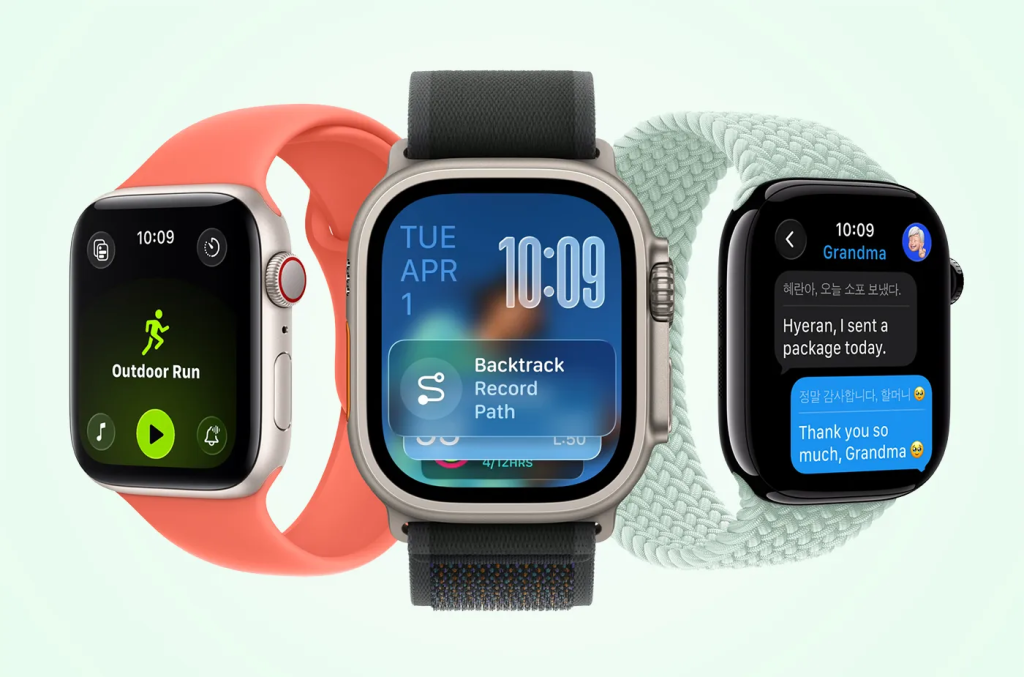
A new design language: Liquid Glass
- What it is: Apple’s Liquid Glass design brings a glossy, semi-transparent look to app windows, notifications, and icons.
- Why it matters: While subtle compared to iPhone or Mac, the shimmering effect makes Smart Stack, Control Center, and apps feel more modern and cohesive.
- Takeaway: Expect a sleeker watch UI without a learning curve.
Wrist flick gesture for faster actions
- How it works: Rotate your wrist outward to silence calls, dismiss notifications, or stop timers.
- Why it matters: It’s quicker than the older double-pinch gesture and more natural in real-world scenarios like meetings or workouts.
- Example use case: Imagine silencing an alarm while carrying groceries; no taps required.
Smarter audio and Notes on your wrist
- Automatic volume adjustment: Calls, Siri responses, and notifications adapt dynamically to your environment. Louder in noisy streets, softer at night.
- Notes app integration: For the first time, you can create notes directly on your Apple Watch. Siri can also draft notes hands-free, turning your watch into a pocket notebook alternative.
Advanced health tracking features
- Hypertension notifications: Using optical sensors, your watch analyzes vascular responses over 30 days to detect early signs of high blood pressure.
- Note: This is not a substitute for medical diagnosis; users should consult a doctor if they receive repeated alerts.
- Sleep score: A simple numerical rating based on sleep duration, interruptions, and bedtime consistency.
- Why it matters: Instead of vague graphs, you now get a clear score that’s easy to track and improve.
Personalization with AI-powered Workout Buddy
- What it does: Uses your past fitness data to provide motivational prompts during workouts.
- Why it matters: Personalized encouragement can boost adherence to exercise routines, especially for casual users.
- Widget customization: Rearrange Smart Stack widgets to highlight what’s most relevant: weather, workouts, reminders, or stock prices.
How to update your Apple Watch to watchOS 26
Updating is straightforward, but a few requirements must be met first.
Before you start:
- Ensure your paired iPhone is running iOS 26.
- Keep your iPhone connected to Wi-Fi and near your watch.
- Charge your Apple Watch to at least 50%.
Step-by-step update process:
- Open the Watch app on your iPhone.
- Navigate to My Watch > General > Software Update.
- If watchOS 26 is available, tap Download and Install.
- Follow the on-screen prompts.
- Keep both devices close until the update completes.
Why should you update to watchOS 26?
- Better usability: Wrist flick gesture and smarter UI reduce friction in daily interactions.
- Deeper health insights: Hypertension alerts and sleep scores provide actionable health data.
- Enhanced personalization: Workout Buddy and customizable widgets give you a more tailored experience.
- Future-proofing: Installing watchOS 26 ensures ongoing security patches and app compatibility.
TL;DR
- watchOS 26 is now available for Apple Watch Series 6+, SE (2nd & 3rd gen), and Ultra models.
- Highlights include Liquid Glass design, wrist flick gesture, Notes app, hypertension notifications, and Workout Buddy AI.
- Update by pairing with an iPhone running iOS 26 → Watch app → General → Software Update.

Florida Man Films Crab Gripping a Knife Blade as It Confronts His Dog
A Florida homeowner got an encounter that sounds more like a scene from a cartoon than a backyard wildlife sighting when he filmed a crab apparently gripping a knife blade in one of its claws....
September 18, 2026
11:54 am
Need a new Car? Rent To Own Cars No Credit Check
need a new car? rent to own cars no credit check ...
September 18, 2026
11:31 am
Microsoft Executive Called AI Scraping ‘Theft’ As New Court Filings Expose Training-Data Battle
Newly unsealed court filings in The New York Times’ copyright lawsuit against OpenAI and Microsoft have revealed internal comments from executives and employees that could add fresh pressure to the companies’ defenses over how copyrighted...
September 18, 2026
11:46 am
Explore The 2025 Jeep Compas: Adventure Awaits!
explore the 2025 jeep compas: adventure awaits!...
September 18, 2026
11:17 am
UNGA 2026: Wars, AI, Climate, and Pandemic Preparedness Top Agenda in New York
World leaders are heading to New York for the 81st session of the United Nations General Assembly(UNGA ) as a string of conflicts, climate pressures, artificial intelligence and pandemic preparedness put international cooperation under renewed...
September 18, 2026
11:43 am
2025 Jeep Wrangler Price One Might Not Want to Miss!
2025 jeep wrangler price one might not want to miss!...
September 18, 2026
11:26 am
Geoffrey Hinton Tells US Lawmakers They May Have About a Year To Rein In AI
Artificial intelligence pioneer Geoffrey Hinton has given US lawmakers a stark timeline for acting on AI safety, saying they may have only about a year before increasingly capable systems become significantly harder to control. Hinton,...
September 18, 2026
11:38 am
Celebrate the Holidays in a New Hyundai Palisade
celebrate the holidays in a new hyundai palisade...
September 18, 2026
11:36 am
Meet Tilcayo: First New Feline Species Identified in Over 100 Years
A tiny spotted cat hiding in Bolivia’s cloud forests has just received a scientific identity, marking the first formal description of a new living cat species in more than a century. Named Leopardus tilcayo, or...
September 18, 2026
11:31 am
Want an SUV with Easy Access and Comfort for Seniors? Here’s How to Get It!
want an suv with easy access and comfort for seniors? here’s how to get it!...
September 18, 2026
11:01 am
Singapore Is Rewarding People For Reading 15 Minutes a Day. Here’s Why
In a country where smartphones and short-form content compete for attention, Singapore is trying an unusually simple intervention: get people to read a book for 15 minutes a day and reward them for showing up....
September 18, 2026
6:06 am
Drive into the Future with the 2025 Subaru Forester
drive into the future with the 2025 subaru forester...
September 18, 2026
6:04 am