


drive into the future with the 2025 subaru forester...
November 28, 2025
11:59 am

explore surprisingly affordable luxury ram 1500...
November 28, 2025
11:54 am
Google Maps’ Latest Feature Helps Extend Phone Battery Life: Here’s How
November 28, 2025
12:15
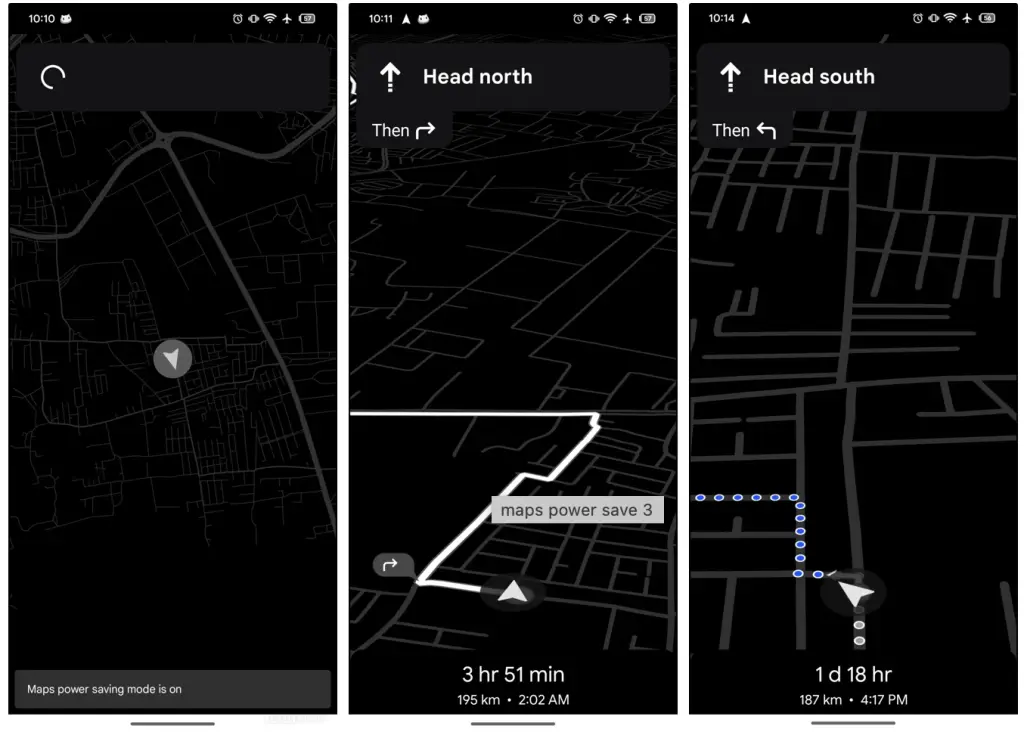
Google Maps is getting a feature many users have requested for years: a way to navigate without watching your phone battery melt away. The new Google Maps Power Saving Mode, available first on the Pixel 10 series, allows turn-by-turn navigation to run in a low-power, simplified interface that trades visual flair for hours of additional usage.
This update marks one of the most practical upgrades Google has made to Maps in years, especially for commuters, long-distance drivers, and anyone who relies heavily on navigation apps. With the feature rolling out now, Pixel 10 owners will be the first to experience a redesigned navigation experience that prioritizes endurance over aesthetics.
Google Maps Power Saving Mode is a new navigation setting designed to reduce battery consumption during driving. Unlike standard battery saver options that affect the entire device, this feature optimizes Google Maps specifically for long trips.
Recent Posts

need a new car? rent to own cars no credit check ...
November 28, 2025
12:05 pm

explore the 2025 jeep compas: adventure awaits!...
November 28, 2025
11:50 am

2025 jeep wrangler price one might not want to miss!...
November 28, 2025
11:50 am

want an suv with easy access and comfort for seniors? here’s how to get it!...
November 28, 2025
12:06 pm
Instead of showing the full navigation interface, Google Maps enters what Google calls AOD Min Mode. This mode displays navigation on the Always-On Display, making the app usable while keeping the screen dimmed and simplified.
The feature is currently exclusive to Pixel 10 and Pixel 10 Pro devices and only activates while driving.
Power Saving Mode reduces battery drain by simplifying the navigation interface and limiting energy-intensive features.
Recent Posts

celebrate the holidays in a new hyundai palisade...
November 28, 2025
12:05 pm

drive into the future with the 2025 subaru forester...
November 28, 2025
11:58 am

explore surprisingly affordable luxury ram 1500...
November 28, 2025
11:57 am

need a new car? rent to own cars no credit check ...
November 28, 2025
11:53 am
Google uses the Pixel 10’s efficient AOD system to run a monochrome, low-brightness, full-screen navigation view. Instead of vivid color-coded lanes or real-time zoom animations, the interface reduces everything to essential information.
In Power Saving Mode, Google Maps turns off:
What remains is the bare minimum needed to navigate safely:
Recent Posts
explore the 2025 jeep compas: adventure awaits!...
November 28, 2025
11:57 am

2025 jeep wrangler price one might not want to miss!...
November 28, 2025
11:53 am

want an suv with easy access and comfort for seniors? here’s how to get it!...
November 28, 2025
12:12 pm

celebrate the holidays in a new hyundai palisade...
November 28, 2025
11:56 am
This minimalism keeps the battery from draining quickly while maintaining clarity on the road.
Full navigation views demand constant screen refreshes, GPS polling, map rendering, internet checks, color display power, and animation cycles. AOD Min Mode minimizes all of them.
Google claims users may gain up to four additional hours of navigation during long trips. For drivers who rely heavily on their phones as their primary GPS system, those four hours can make the difference between a seamless journey and a dead phone halfway to the destination.
Recent Posts

drive into the future with the 2025 subaru forester...
November 28, 2025
11:52 am

explore surprisingly affordable luxury ram 1500...
November 28, 2025
11:55 am

need a new car? rent to own cars no credit check ...
November 28, 2025
11:53 am

explore the 2025 jeep compas: adventure awaits!...
November 28, 2025
11:53 am
The feature is designed to trigger easily without distracting the driver.
To activate Power Saving Mode:
This instantly switches Google Maps into low-power AOD Min Mode.
Recent Posts

2025 jeep wrangler price one might not want to miss!...
November 28, 2025
12:13 pm

want an suv with easy access and comfort for seniors? here’s how to get it!...
November 28, 2025
11:57 am

celebrate the holidays in a new hyundai palisade...
November 28, 2025
12:01 pm

drive into the future with the 2025 subaru forester...
November 28, 2025
11:55 am
There is no need to dig through settings while driving, which keeps the process safe and intuitive.
For Pixel 10 users, Google Maps Power Saving Mode is enabled out of the box. This means the app may automatically switch into AOD Min Mode when you begin navigating.
If you prefer the traditional full-color interface, you can disable the feature:
Recent Posts

explore surprisingly affordable luxury ram 1500...
November 28, 2025
12:12 pm

need a new car? rent to own cars no credit check ...
November 28, 2025
11:58 am

explore the 2025 jeep compas: adventure awaits!...
November 28, 2025
12:12 pm

2025 jeep wrangler price one might not want to miss!...
November 28, 2025
12:04 pm
This customization ensures drivers can choose between battery longevity and a more detailed visual map.
While Google has not explained the restriction in detail, there are several likely technical reasons for Pixel exclusivity:
The Pixel 10 series includes updated display drivers and more efficient Always-On Display hardware. AOD Min Mode depends on these optimizations to run navigation continuously without overheating or draining the battery too quickly.
Recent Posts

want an suv with easy access and comfort for seniors? here’s how to get it!...
November 28, 2025
12:07 pm

celebrate the holidays in a new hyundai palisade...
November 28, 2025
11:56 am

drive into the future with the 2025 subaru forester...
November 28, 2025
12:13 pm
explore surprisingly affordable luxury ram 1500...
November 28, 2025
12:10 pm
Google’s Tensor G4 chipset includes optimizations for background processes and sustained low-power modes. Running Maps continuously on AOD requires precise thermal and battery balancing, which Tensor devices are tuned for.
Google often launches exclusive features on Pixels first, then expands them to other Android phones after months of testing. This may follow the same pattern as previous Pixel-first features such as Call Screening, Hold for Me, and offline Live Translate.
Navigation apps are among the most power-hungry smartphone tools. Long drives often require users to constantly charge or carry backup batteries. Power Saving Mode directly addresses this pain point.
Recent Posts

need a new car? rent to own cars no credit check ...
November 28, 2025
12:01 pm

explore the 2025 jeep compas: adventure awaits!...
November 28, 2025
12:08 pm

2025 jeep wrangler price one might not want to miss!...
November 28, 2025
12:06 pm

want an suv with easy access and comfort for seniors? here’s how to get it!...
November 28, 2025
12:05 pm
A simplified, low-distraction interface can reduce the chances of driver over-reliance on animated map elements. Minimalism forces the user to focus on essential turn cues instead of the map’s visual noise.
Sustained full-screen navigation can cause phones to heat up, leading to performance throttling. Running Maps on AOD keeps temperatures lower, which can help maintain long-term battery health.
This update suggests Google may be moving toward a future where:
Recent Posts

celebrate the holidays in a new hyundai palisade...
November 28, 2025
11:54 am
drive into the future with the 2025 subaru forester...
November 28, 2025
11:50 am
explore surprisingly affordable luxury ram 1500...
November 28, 2025
11:56 am
need a new car? rent to own cars no credit check ...
November 28, 2025
11:57 am
Google has been gradually redesigning Maps to remove clutter, improve readability, and add more contextual information. The introduction of Power Saving Mode supports a larger shift toward adaptive interfaces—interfaces that adjust based on context, environment, and user behavior.
For example:
This new AOD-based navigation experience suggests that Google wants Maps to be more flexible, power-efficient, and context-aware.
Google Maps Power Saving Mode is a new feature for Pixel 10 phones that shifts navigation to a dim, monochrome Always-On Display, removing energy-intensive elements. It can add up to four hours of battery life during long drives, activates with a single tap, and is enabled by default. Though Pixel-exclusive for now, it hints at a future where all Android users get more efficient navigation options.
Recent Posts

A Florida homeowner got an encounter that sounds more like a scene from a cartoon than a backyard wildlife sighting when he filmed a crab apparently gripping a knife blade in one of its claws....
September 18, 2026
11:54 am
explore the 2025 jeep compas: adventure awaits!...
September 18, 2026
11:47 am

Newly unsealed court filings in The New York Times’ copyright lawsuit against OpenAI and Microsoft have revealed internal comments from executives and employees that could add fresh pressure to the companies’ defenses over how copyrighted...
September 18, 2026
11:46 am
2025 jeep wrangler price one might not want to miss!...
September 18, 2026
11:16 am

World leaders are heading to New York for the 81st session of the United Nations General Assembly(UNGA ) as a string of conflicts, climate pressures, artificial intelligence and pandemic preparedness put international cooperation under renewed...
September 18, 2026
11:43 am
want an suv with easy access and comfort for seniors? here’s how to get it!...
September 18, 2026
11:35 am

Artificial intelligence pioneer Geoffrey Hinton has given US lawmakers a stark timeline for acting on AI safety, saying they may have only about a year before increasingly capable systems become significantly harder to control. Hinton,...
September 18, 2026
11:38 am
celebrate the holidays in a new hyundai palisade...
September 18, 2026
11:23 am

A tiny spotted cat hiding in Bolivia’s cloud forests has just received a scientific identity, marking the first formal description of a new living cat species in more than a century. Named Leopardus tilcayo, or...
September 18, 2026
11:31 am
drive into the future with the 2025 subaru forester...
September 18, 2026
11:03 am

In a country where smartphones and short-form content compete for attention, Singapore is trying an unusually simple intervention: get people to read a book for 15 minutes a day and reward them for showing up....
September 18, 2026
6:06 am
explore surprisingly affordable luxury ram 1500...
September 18, 2026
5:56 am